PracticePing Patient Messaging · Last updated: September 29, 2026
PracticePing sends text messages only to patients of participating medical practices who have consented to receive PracticePing messages. Patients give consent in one of three ways: by checking the SMS consent box on the practice's intake form, verbally to practice staff (who read the script below and record the consent), or by checking the optional SMS consent box on the practice's online appointment request form. Consent is optional and is not a condition of receiving care.
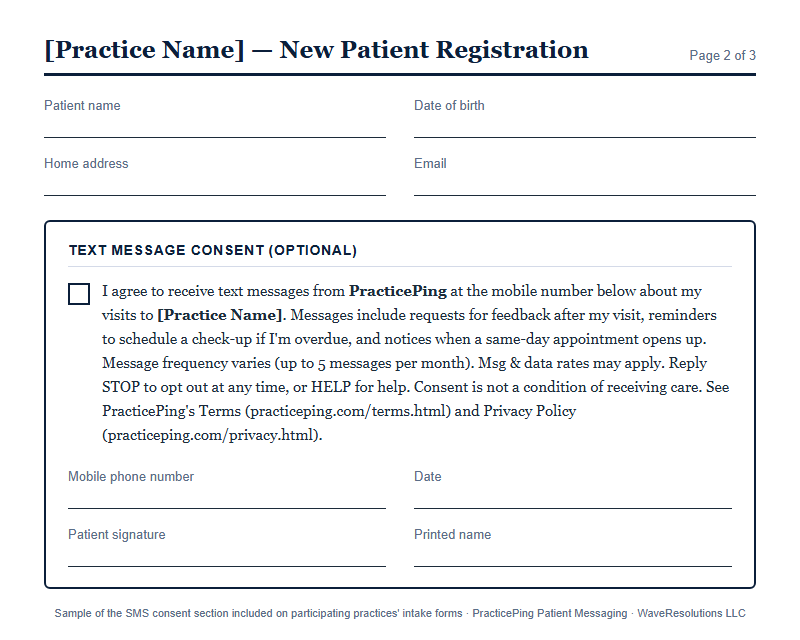
Participating practices include the following SMS consent section on their patient intake/registration form. The patient checks the box, writes their mobile number, and signs.
I agree to receive text messages from PracticePing at the mobile number below about my visits to [Practice Name]. Messages include requests for feedback after my visit, reminders to schedule a check-up if I'm overdue, and notices when a same-day appointment opens up. Message frequency varies (up to 5 messages per month). Msg & data rates may apply. Reply STOP to opt out at any time, or HELP for help. Consent is not a condition of receiving care. See PracticePing's Terms (practiceping.com/terms.html) and Privacy Policy (practiceping.com/privacy.html).
Image of the form: practiceping.com/sms-consent-form.png
When a patient gives consent in person or by phone, front-desk staff read this script word for word:
Staff record the patient's answer, the mobile number, the date, and the staff member's name in the practice's patient record. PracticePing only sends messages to numbers the practice has marked as consented.
Each practice has an online appointment request page hosted by PracticePing. The form asks for the patient's name, contact details, and preferred times. Below the form is an optional checkbox that is unchecked by default. The request can be submitted without checking it; texts about the request are sent only if the patient checks the box.
I agree to receive text messages from PracticePing about my appointment request with [Practice Name] (such as available appointment times). Message frequency varies. Msg & data rates may apply. Reply STOP to opt out or HELP for help. Consent is optional and not required to request an appointment. See PracticePing's Terms (practiceping.com/terms.html) and Privacy Policy (practiceping.com/privacy.html).
The checkbox value is stored with the request. Practice staff can reply to the request by text only if the patient checked the box; otherwise they reply by email or phone.
After consenting, patients receive only these kinds of messages. Every message identifies the practice and includes opt-out instructions. Messages never include diagnoses or treatment details.
Feedback request after a visit
Check-up reminder (patient overdue for a visit)
Same-day appointment opening
Reply to an online appointment request
Opt-out confirmation (after STOP)
Help response (after HELP)
Patients can reply STOP to any message at any time. PracticePing immediately stops all messages to that number and sends one confirmation. Patients can also ask their practice to stop messages.
Questions? Contact info@waveresolutions.com. See our Terms and Privacy Policy.